Recent Posts (all)
As written previously, here’s the second post about writing scientific articles. So the objective is to have people read, remember and cite our work. What makes an article a good articles?
Good title
When scrolling through the new articles of the day, or through the results of a search engine, we
see only the titles of the papers. If the title is boring, unattractive, or if it doesn’t explain
what you have accomplished, we will have a hard time clicking on it. The title has to lure the
readers inside the paper, the same way carnivorous plants lure insects in their traps. Once inside,
as opposite to plants traps, the readers are still free to go, so we need to write it right to keep
them inside. But they have to get in, so spend some time on the title, brainstorm with your
colleagues, take a walk, a ride, whatever: find a good title!
First and last sentence
The first and last sentence of the article are the most important. The first says in which area the
article is and connects it to our everyday life. The last says what you have accomplished and state
which implications your work will have for science and for the rest of the world. Writing them
right is extremely important. It just so happen that one of the teacher found my first sentence
beautiful (I’m not picking this adjective up, that’s what he wrote), so here you go
Every cell in our body, whose typical size is 10 micron, contains
DNA which, if stretched, would be approximately two meters
long.
The sentence is very simple, short, yet states the problem very clearly: the DNA cannot fit in our
cells if not compacted in some way. Body, cells, length, they are all things people understand, or
feel connected to.
If after these two sentences the reader is still there, then probably the abstract is the next
chewed thing.
Good abstract
The abstract has to contain your whole article in short. State the problem, why do we care about
it, how you solved the problem or a part of it, the consequences for the world and future works. It
is kind of shrank, but that’s how people want it. If the results are clearly stated, then they may
cite you without even reading the rest of the paper (this is not a good practice but, alas, so it
happens). So in general you may write the abstract for people who only read it, skipping all the
rest (except first and last sentence). So don’t refer to figures or equation: the abstract should
be self-contained.
All the rest
After the first sentence, make things more and more specific, but let all the technicalities
outside the introduction. Explain here the 3 letters acronyms you will use later, except if sure
everyone knows them (for example DNA or, maybe,
LHC).
You can use a friendly style when writing, but do NOT
write a diary, like: the first day we found this and that, and that he came along saying this, so
we changed the method, etc. No one care about it. If you want to write a diary, use
MacJournal or OrgMode
or whatever suits you. Do not waste journal space.
How to structure the article
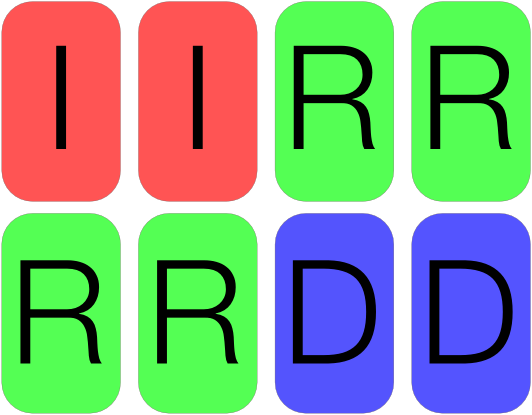
How much introduction (I), how much calculations and results (R), how much discussion (D)? Well, something like in the picture below. And what about the methods and the algorithms we are so proud of? They may just go in the Appendix, or, if space is an issue, a complementary materials pdf. If someone is really interested about your work, they will look it up, don’t worry.
All the article should follow the basic principles of storytelling, which is create a tension
inside the reader so that he want to finish the article, is curious about the end. Every writer,
from Andersen to Bulgakov, knows that. You tell something to the reader, but not all, you make him
curious, let him experience some tension, and, at the end, but only at the end, you give him what
he wants. That’s a long story made short, because story
telling needs years to be mastered and books to be
learned. If you want to know more about it, you can begin
here: writing a good story is
very similar to writing a good article or delivering a great presentation, because inside every
scientist there once was a kid who once heard Snow-white, Hansel and
Gretel, etc. (I’m not kidding!).
Keywords
Spend some time on keywords, because this is how your article is going to pop-up when searching for
its contents. Keywords are word which are relevant to the paper and are not in the title (they are
already indexed, so don’t repeat yourself). Try to think what would you search if you wanted to
find your article. Monitor the article in your field to see what the others used as keywords. And
use this neat trick if there is a paper very similar to yours, already published and very good: if
you think those who read that paper should also read yours, copy some keywords of that paper: when
searching for them, both will pop up; and if you listened to what I said and therefore have a title
sexy enough, people will read your paper too!
That’s it
Well, this was basically what I learned from the course. If it happens that you will have the opportunity to follow it, just do it! The webpages of the write it right course is at, rare enough, http://write-it-right.org/.
As a PhD student for FOM I’m offered to follow some soft-skill courses during my career. These included the ‘Art of Presenting Science’ and ‘Write it right’. The latter ended Friday, 16 of April, and it was a two days course teaching how to write better papers. But why should we write it right? There are several reasons. But probably we care just about one. Publishing! If we want to make a living out of our scientific career we have to publish as much as possible. This means to convince one editor and two referees that our work is worth! But how? First we have to lure them into our articles. Then the articles have to be enough sexy to keep them reading, understanding and agreeing.
This is not only true for the referees: you also want the other readers to keep reading, to understand and to agree. Only in this way they will cite your papers, they will make you famous and eventually they will offer you a job.
Well, let me tell you, it surely seems like a hell of a job. But reading on will help you getting things done.
Keep it simple
Although good in English, we are not native speakers. The simpler we keep it, the less mistakes. Furthermore, most of the readers have an english level lower than ours: so KEEP IT SIMPLE! Use the Gunning fog index if unsure about a passage. This index is designed to keep your sentences short and without complicated words. You do not have to show off your English: you will impress your referees with your results, so keep the English simple and out of the way.
There is another reason to keep a sentence short: our attention-per-sentence vanishes after 30 words. Then try to avoid anything longer than 15: in this way you will not only keep your audience, but they will also feel smart: they’re understanding this difficult bosonic nuclear reacting stuff paper with little effort! And if the introduction in the article is well written, they will cite your clear and easy (yet complete!) paper when writing their own. Another free lunch that comes if you stay away from long sentences, is that they are more difficult to keep coherent and to construct.
Speaking of construct, avoid all unnecessary constructions! Don’t use
It could be noted that: just replace it with Note. The same holds for In order to: a to will make the same job, for less typing. If is possible to shorten a sentence while preserving the sense, then go for it! The two examples above are, well, just examples, there are many more cases where this applies.
Example
It is the scope of this paper to determine which..
becomes
Here we determine which..
This was a personal mistake I did in my exercise (before taking the course), and the correct form looks 1000 times nicer than the original.
Another advice is to use the active form instead of the passive
one. The passive one seems more formal, more objective, but keeps the
reader away from the subject and it is longer reading and using it. It
is archaic in the blog and
twitter era. If everywhere around
passive is less and less used, reading a paper all written in passive
form feels weird. Do we want our readers to feel weird? No we want
them feeling comfortable with us, we want them citing us! But this is
not the only reason: writing passive sentences without mistakes is
more difficult, so keep them active!
There are however cases where you need the passive form: use it, but not too much (they advised us to write the article 2/3 in the active form, and 1/3 in the passive one, so keep these proportions in mind).
All the above should contribute to a shorter paper, which is good for three reason
-
journals have a limited amount of pages per year, therefore editors like short articles;
-
referees do not care about journals space limit; they care however for their time limit: the shorter an article, the more time they have for their things
-
if a reader can learn about your results in 4 pages, he will not be happy when reading about them in 10!
Better technical English
Journals do not publish articles poorly written. The first thing a referee has to say is whether the article is clear and written in correct English. So in addition to what said above
-
avoid the to + verb form: it is better the verb + ing, because often the infinite is wrongly used.
-
the pompous it, or pit: when you find a it in your paper, ask yourself “To what does it refer?”. If you can answer the question, keep it, otherwise “off with his head”.
Example
In order to access information it is necessary…
becomes
To access information is necessary…
Not only the it is gone, but also In order to is replaced by to. Without changing the sense of the sentence.
-
use inverted commas around a word only when is used in a novel way or uncommon context
-
avoid repetition we said that we would like to see whether we are able to convince you that we…
-
do not use abbreviations like don’t or he’s: they are a bit slangy and they may be ambiguous: does he’s mean he has or he is?
-
Avoid double negation to say a positive thing.
Example
Do not make it longer than..
becomes
Make it shorter than..
While leaving Amsterdam behind me, driving, I was listening to Radio 1. They were interviewing Jos Baijens, high-school teacher in Eindhoven, whose popularity recently increased for wearing a muslim scarf in public, as a protest for a proposal by Geert Wilders, which would like to introduce a 1000€/year tax for women who wish to wear such a scarf for religious reasons in public. Baijens was so contrary to such a proposal, that he decided to wear the scarf in the same way muslim women wear it, in public.
Besides agreeing or not with the proposal or with the protest, I was impressed when the presenter asked Jos what his children had to say when they saw him “scarfed” like a woman. Being Italian, I expected the children to say whether they agreed or not with his father. No. They said (roughly translated) “Dad, if you think it’s important to do so to express your opinion, you should do it”. They didn’t say “Dad, you could be a Wal-Creature” or whatever; instead they expressed all the Dutch tolerance by simply saying that he could do as wished. No support, or lack of support of his idea. They simply don’t care, do they? They simply mind their business. It’s all very Dutch, you know.
Merlin Mann on emails
If you work a lot with emails, then you should watch (or hear) this talk by Merlin Mann.
Today I stumbled upon a Lifehacker article which explained how to change the background color in Adobe Reader, when displaying PDF (which could alleviate the eyes’ stress if reading a lot). Well, it turn out that the same can be accomplished with my favorite OS X pdf reader, Skim (from version 1.3.4 on). Just open Skim, then fire up Apple Script editor, and paste the following code
tell application "Skim"
set theColor to choose color
set page background color to theColor
end tell
It is not a great hassle to do it once, but if you plan to do it more frequently, you can save the script as an application, and then drag it to the Finder toolbar, so that you will always have it available
To add a shortcut for the Menu Item Copy as PDF you have to do the following (with a Mac) go to
/Applications/Mathematica/SystemFiles/FrontEnd/TextResources/Macintosh
MenuItem["PDF", FrontEnd`CopySpecial["PDF"]],
MenuItem["PDF", FrontEnd`CopySpecial["PDF"], MenuKey["C", Modifiers->{"Command", "Option"}]],
To use Leiden ezproxy with Leiden university you have to do the following. Open with Textedit.app the file
~/Library/Application
Support/Papers/PlugIns/SearchEngines/WOSSearchEngine.searchengine/Contents/Resources/gatewayurl.txt
http://wok-ws.isiknowledge.com.ezproxy.leidenuniv.nl:2048/esti/soap/SearchRetrieve
gatewayurl.txt (if you editor places them automatically, change editor for a moment).
Then fire up Papers. Go to Preferences -> Sources and as Authentican URL use
http://wok-ws.isiknowledge.com.ezproxy.leidenuniv.nl:2048/esti/soap/SearchRetrieve
http://ezproxy.leidenuniv.nl:2048/login?url=%@
SearchRetrieve
Hi there, this is an AXIS service!
Perhaps there will be a form for invoking the service here...
If you also have experienced some problem accessing fonts presents in
/System/Library/Fonts with X11 applications (like Inkscape and The Gimp), then you may
have found the solution: copy the fonts you would like to use from
/System/Library/Fonts to /Library/Fonts, restart X11 and..retry!
Hugo Chroma Syntax Highlighting Dark/Light Mode
One of the issues I still had with this blog was that the syntax highlighting for code blocks was static and generated at compile time, whereas the rest of the site changed colors based on the system theme.
I’m glad I fixed it today following the linked article.
←
14/14